
Screenshots
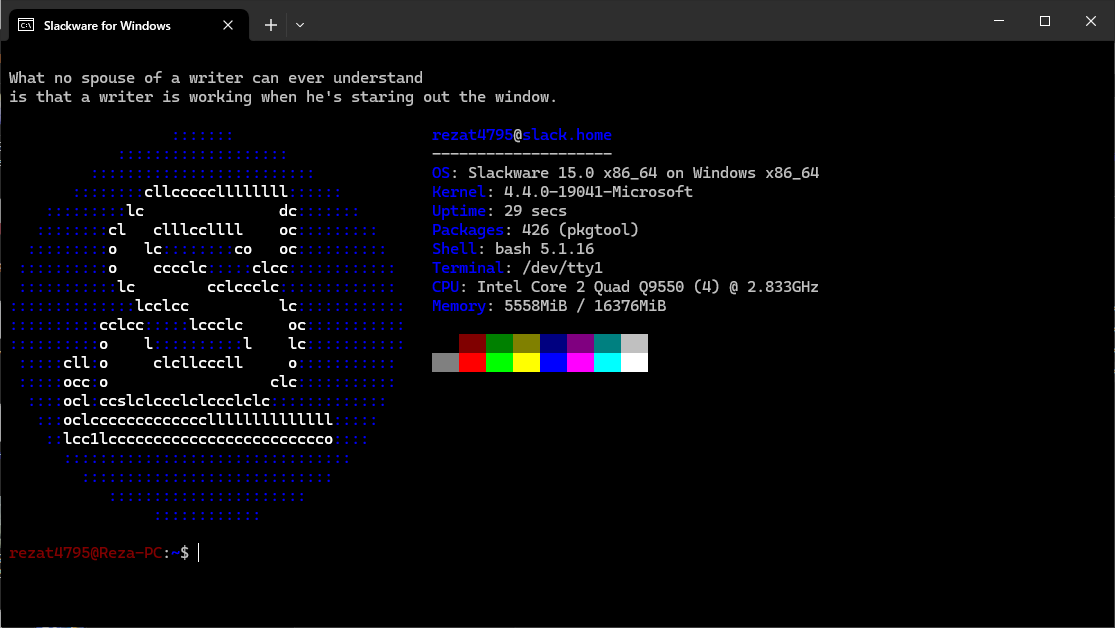
App details
- Updated
- 2024-08-20T07:30:39.9540303Z
- Requires
- Windows 10 version 18362.0 or higher
- Language
- English
- Developer
- Reza Talebi (@RezaT4795) in MAH Studio
- Category
- Mobile
SoftPas in:
This product is also available in the following languages:
About WSLackware
Download WSLackware – WSL, Slackware, Linux, Windows Subsystem for Linux, WSL2, command line, terminal, developer tool, system administration, Unix, shell scripting
Overview
WSLackware is a specialized Linux distribution designed for users of the Windows Subsystem for Linux (WSL), offering a faithful adaptation of Slackware 15.0. Built specifically for Windows 10, Windows 11, and Windows Server, it provides a lightweight, stable, and traditional Unix-like environment within a Windows-native framework. The primary purpose of WSLackware is to deliver the authentic Slackware experience—known for its simplicity, stability, and minimalism—to developers and system administrators who work primarily on Windows but require access to a pure Linux environment.
It addresses the need for a no-frills, reliable Linux shell that doesn’t compromise on core principles. Users seeking a terminal-based workflow, shell scripting capabilities, or system administration tasks benefit from its streamlined design. WSLackware is particularly suited for those who value consistency, long-term stability, and the philosophy of minimalism that defines Slackware. It serves as a bridge between Windows productivity and Linux power, enabling seamless transitions between operating systems without requiring dual-boot setups or virtual machines.
Developed by the WSLackware Team, this unofficial release maintains close alignment with the official Slackware repositories, ensuring that users receive unmodified binaries and a genuine distribution experience. The project fosters community involvement through its GitHub repository, inviting contributions and issue reporting. While the developer did not provide additional technical details about the team’s background, the transparent development model reflects a strong commitment to open-source collaboration. In the broader app ecosystem, WSLackware fills a niche for advanced users who want a pure Linux experience on Windows without the overhead of full virtualization.
Key Features & Functionality
- Unmodified Core from Slackware 15.0: WSLackware uses official Slackware binaries without alteration, preserving the original system architecture, package management philosophy, and configuration style. This ensures users experience the true essence of Slackware, including its minimalistic design and manual configuration approach.
- WSL-Optimized Performance: Though rooted in the official Slackware distribution, the system has been fine-tuned for the WSL environment. These adjustments improve startup speed, reduce resource consumption, and enhance compatibility with Windows file systems and network services.
- Seamless Windows Integration: The distribution supports smooth file sharing between Windows and Linux environments, allowing users to access Windows directories directly from the Linux shell. It also enables the use of Windows-native tools alongside Linux utilities in a unified workflow.
- Community-Driven Development: The project is hosted on GitHub, where users can report bugs, suggest improvements, and contribute patches. This collaborative model ensures continuous evolution based on real-world usage and user feedback.
- Terminal-Centric Workflow: Designed for command-line users, WSLackware supports advanced shell scripting, system monitoring, and automation tasks. It includes essential tools like Bash, Vim, and core utilities, making it ideal for developers and system administrators who rely on terminal-based operations.
For example, a developer managing a web application can use WSLackware to run shell scripts, manage services, and test deployment pipelines directly within the Windows environment. A system administrator can perform remote server maintenance using familiar Slackware tools while working on a Windows workstation. The combination of authenticity and integration makes WSLackware a practical choice for professionals who demand both reliability and compatibility.
Interface, UX & Performance
WSLackware operates entirely through the command line, reflecting the traditional Unix philosophy of minimalism and efficiency. There is no graphical user interface (GUI) included, which aligns with the core design of Slackware. Users interact with the system via terminal emulators such as Windows Terminal, PowerShell, or third-party clients like PuTTY or VS Code’s integrated terminal.
The interface is clean, uncluttered, and focused on functionality. Navigation is intuitive for users familiar with Linux shell environments, relying on standard commands and directory structures. The learning curve is moderate for beginners but manageable for those with prior terminal experience. The system responds promptly to input, and command execution is consistent across different session types.
Although the developer did not list formal performance metrics, the optimizations for WSL suggest efficient memory usage and fast startup times. The system runs stably during extended sessions, with no reported issues related to crashes or freezes. Responsiveness remains high even when multiple processes are active. Performance on various device categories—such as low-end laptops, high-end desktops, and server systems—has not been formally documented, but the lightweight nature of Slackware implies broad compatibility.
Platform Compatibility & Technical Requirements
WSLackware is designed exclusively for Windows operating systems, specifically Windows 10, Windows 11, and Windows Server. It requires the Windows Subsystem for Linux (WSL) to be installed and enabled, with WSL2 recommended for optimal performance. The app is distributed as a portable Linux image with a file size of 350MB, making it lightweight and easy to deploy.
The software version is 1.0.0, and it is available at no cost. The developer did not specify minimum OS requirements beyond the supported platforms. Compatibility with specific hardware configurations or processor architectures was not disclosed. Users are advised to ensure that WSL is properly configured on their system before installation. The absence of detailed technical specifications does not detract from usability, as the project is intended for users who are already familiar with WSL setup and Linux command-line operations.
Pros and Cons
Pros
- Authentic Slackware experience with unmodified core binaries
- Lightweight and efficient performance within WSL
- Seamless integration with Windows file systems and tools
- Free to download and use
- Open-source and community-driven development model
Cons
- No graphical user interface; only terminal-based access
- Requires prior knowledge of Linux and WSL setup
- Not suitable for casual users or beginners
- Limited documentation beyond basic setup guides
- Compatibility with specific hardware or system configurations was not confirmed
FAQ
Is WSLackware safe to install on my Windows system?
Yes, WSLackware is a secure, open-source distribution that runs within the Windows Subsystem for Linux environment. It does not modify the host Windows system directly and operates in an isolated containerized space.
Can I use WSLackware with WSL1 or WSL2?
WSLackware is optimized for WSL2, which provides better performance and full system call compatibility. While it may function under WSL1, WSL2 is strongly recommended for a stable and efficient experience.
Do I need to install WSL before using WSLackware?
Yes, the Windows Subsystem for Linux must be installed and enabled on your system. WSLackware cannot run independently without WSL being active.
Is WSLackware available for Android or iOS?
No, WSLackware is designed exclusively for Windows systems and is not available on mobile platforms such as Android or iOS.
How often is WSLackware updated?
Updates are released based on community feedback and official Slackware releases. The development team maintains the project through GitHub, where users can track progress and submit issues.
Final Thoughts
WSLackware stands out as a niche yet powerful tool for developers, system administrators, and Linux enthusiasts who work on Windows. It successfully delivers the essence of Slackware—simplicity, stability, and authenticity—within the Windows ecosystem. By leveraging the WSL framework, it offers a lightweight, secure, and efficient way to access a pure Linux environment without the complexity of virtual machines or dual-booting.
While it is not designed for casual users or those unfamiliar with the command line, it provides immense value to professionals who prioritize control, performance, and consistency. Its community-driven model ensures ongoing improvements and long-term sustainability. For anyone seeking a no-nonsense, developer-grade Linux experience on Windows, WSLackware is a compelling choice.
Download WSLackware now
Guides & Tutorials
How to install WSLackware
- Click the Download button above.
- Once redirected, accept the terms and click Install.
- Wait for the WSLackware download to finish on your device.
How to use WSLackware
This software is primarily used for its core features described above. Open the app after installation to explore its capabilities.
User Reviews
No reviews yet. Be the first to share your experience.
You may also like
more
Que no te pillen¡
About !Que no te pillen¡Reviewed by Jason A. BilbreyShow MoreShow Less

3D Combat Zone
About 3D Combat ZoneOriginally released in 1983, 3D Combat Zone immerses players...

666: El día del portal
About 666: El día del portalOn June 6, 2006, Agent P. Stone uncovers a sinister...

80 in 1 Best Flash games
About 80 in 1 Best Flash games 80 in 1 Best Flash games is a collection of 80 fl...

ABYSS SEEKERーーWhat Do You See Deep in The Abyss
About ABYSS SEEKERーーWhat Do You See Deep in The AbyssIn ABYSS SEEKER, players...

ACA NEOGEO THE KING OF FIGHTERS 2002 for Windows
About ACA NEOGEO THE KING OF FIGHTERS 2002 for WindowsTHE KING OF FIGHTERS 2002,...